

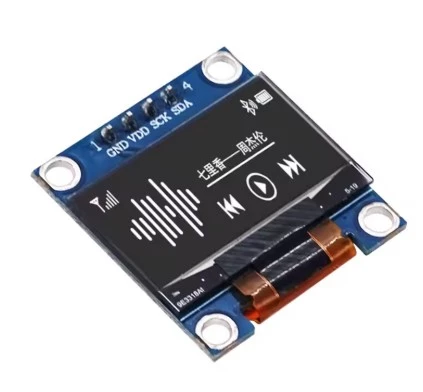
0.96'' OLED DISPLAY I2C INTERFACE
Share :
The 0.96-inch OLED I2C display is one of the most popular displays used in microcontroller projects (like Arduino, ESP32, Raspberry Pi, etc.) due to its high contrast, low power consumption, and simple wiring.
Here is a breakdown of the key technical details and how to use it:
| Feature | Detail |
| Size | 0.96 inches (diagonal) |
| Resolution | Typically 128 x 64 pixels or sometimes 128 x 32 pixels |
| Color | Monochrome (usually White or Blue, sometimes with a fixed yellow strip at the top) |
| Driver IC | Most commonly the SSD1306 |
| Interface | I2C (or IIC / TWI - Two-Wire Interface) |
| Pins | 4 pins: VCC, GND, SCL (Clock), SDA (Data) |
| Voltage | Compatible with 3.3V and 5V (has an onboard regulator) |
| I2C Address | Most common addresses are 0x3C or 0x3D (You may need to run an I2C scanner sketch to confirm) |
The I2C protocol makes wiring very simple, requiring only four connections:
| OLED Pin | Arduino Uno/Nano Pin | Function |
| VCC | 5V or 3.3V | Power supply |
| GND | GND | Ground |
| SCL | A5 | Serial Clock Line (I2C Clock) |
| SDA | A4 | Serial Data Line (I2C Data) |
For Arduino Mega: SCL is Pin 21, and SDA is Pin 20.
For ESP32/ESP8266: The I2C pins are usually flexible; check the specific board's documentation (e.g., typically GPIO 21/22 on ESP32).
To easily control the display from your Arduino IDE, you need to install the following two libraries (usually found in the Arduino Library Manager):
Adafruit GFX Library: This is the core Graphics Library that provides drawing primitives (lines, circles, text, bitmaps).
Adafruit SSD1306 Library: This handles the low-level communication and specifics for the SSD1306 driver chip.
Install Libraries: Open the Arduino IDE, go to Sketch > Include Library > Manage Libraries, and search for and install both Adafruit GFX and Adafruit SSD1306.
Run Example: After installing, go to File > Examples > Adafruit SSD1306 and select one of the demonstration sketches (e.g.,
ssd1306_128x64_i2c).Check Address: In the example code, ensure the I2C address is set correctly (e.g., display. Begin
(SSD1306_SWITCHCAPVCC, 0x3C) ;). If the display doesn't work, run an I2C scanner sketch to find the correct address for your specific module.
What project are you planning to use the 0.96" OLED display for? Why not get it here and stop looking else where