

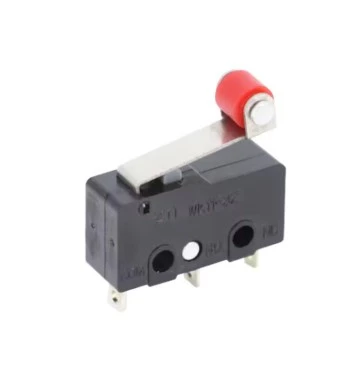
LIMIT SWITCH 5A/250V 3 PIN
Share :
These are electromechanical components used in countless applications—from appliances and toys to industrial machinery—to detect the presence, position, or limits of motion for a moving part.
Here is a breakdown of the key specifications you mentioned and how these switches are typically configured:
| Pins | Configuration | Common Terminology | Description |
| 2-Pin | Simple, single-state switch. | NO (Normally Open) or NC (Normally Closed) | The two pins connect to either the NO terminal and the Common terminal, OR the NC terminal and the Common terminal. You only get one connection option. |
| 3-Pin | Versatile, double-throw switch. | SPDT (Single Pole, Double Throw) | This is the most common configuration. The three pins are Common (C), Normally Open (NO), and Normally Closed (NC). This allows you to wire the switch to either turn a circuit ON or turn it OFF when the actuator is pressed. |
2. Contact State (NO vs. NC)
These states describe the switch's electrical connection when the actuator (plunger or lever) is not pressed:
NO (Normally Open): The circuit is open (OFF) in its default, unactuated state. Pressing the switch closes the circuit (ON).
NC (Normally Closed): The circuit is closed (ON) in its default, unactuated state. Pressing the switch opens the circuit (OFF).
A 3-pin switch has both an NO and an NC terminal relative to the common pin.
3. Electrical Ratings
5A: This is the maximum current the switch contacts can reliably carry and interrupt. You should never exceed this 5-amp limit, whether you are switching DC or AC.
250VAC: This is the maximum voltage the switch is rated to handle on an Alternating Current (AC) circuit.
If you purchase a typical 3-Pin limit switch (which is recommended for flexibility), you will have three terminals:
C (Common): This is the input terminal, connected to your power source (or ground/neutral, depending on your design).
NC (Normally Closed): Use this terminal if you want the circuit to be ON by default and turn OFF when the switch is pressed.
NO (Normally Open): Use this terminal if you want the circuit to be OFF by default and turn ON when the switch is pressed.
These switches are often used in projects like 3D printers, garage door openers, and CNC machines to establish "home" positions or detect the end of travel.