

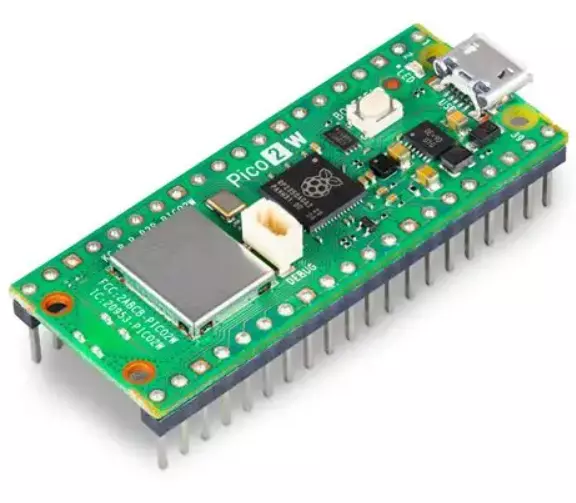
Raspberry pi pico W TYPE C
Share :
The Raspberry Pi Pico W is a microcontroller board developed by the Raspberry Pi Foundation, built upon their in-house RP2040 chip, and is the successor to the original Pico. Its key differentiating feature is the addition of 2.4 GHz wireless LAN (Wi-Fi) connectivity.
Key Features and Specifications
The Pico W is a powerful, low-cost platform designed for embedded and Internet of Things (IoT) projects.
| Component | Specification | Notes |
| Microcontroller | RP2040 (Dual-core ARM Cortex-M0+) | Clocked up to 133 MHz for flexible performance. |
| Wireless Chip | Infineon CYW43439 | Provides 2.4 GHz 802.11n Wi-Fi and Bluetooth 5.2 (Bluetooth support is pending in official software). |
| Memory | 264KB SRAM (on-chip) | 2MB QSPI Flash (on-board) for code and data storage. |
| GPIO | 26 Multi-function GPIO pins | All I/O is 3.3V logic (not 5V tolerant). |
| Peripherals | 2x UART, 2x SPI, 2x I2C, 16x PWM channels, 3x 12-bit Analog-to-Digital Converter (ADC) inputs. | |
| Unique Feature | 8x Programmable I/O (PIO) State Machines | Allows for the creation of custom hardware interfaces. |
| Programming | MicroPython (most common) or C/C++ | Uses "drag-and-drop" programming via the USB mass storage mode (UF2 bootloader). |
| Power Input | 1.8V – 5.5V via Micro-USB connector or VSYS pin. |
Applications
The integrated Wi-Fi capability opens up the Pico W to a vast range of connected projects:
Internet of Things (IoT): Connecting sensors (temperature, humidity, etc.) to the internet to log data or send notifications.
Web Servers: Hosting small, simple web pages to remotely control GPIO pins (e.g., turning lights on/off) or display sensor readings.
Home Automation: Building custom smart devices that connect to your home network.
Wireless Prototyping: Developing a proof-of-concept for commercial products requiring Wi-Fi communication.
Getting Started with Wi-Fi
To use the Pico W, you must first install the appropriate MicroPython UF2 firmware file (the specific Pico W version is required for Wi-Fi support) by:
Holding the BOOTSEL button while connecting the Pico W to your computer via a Micro-USB cable.
Dragging and dropping the Pico W UF2 file onto the mounted RPI-RP2 drive.
Once the firmware is installed, connecting to a Wi-Fi network typically involves a few lines of code using the network module in MicroPython: